01
One-Time Overlay Toggle
Enable the standard Android "Display over other apps" permission. QuickDraw operates purely as an on-demand screen overlay—no invasive Accessibility Services or background accessibility daemons required.
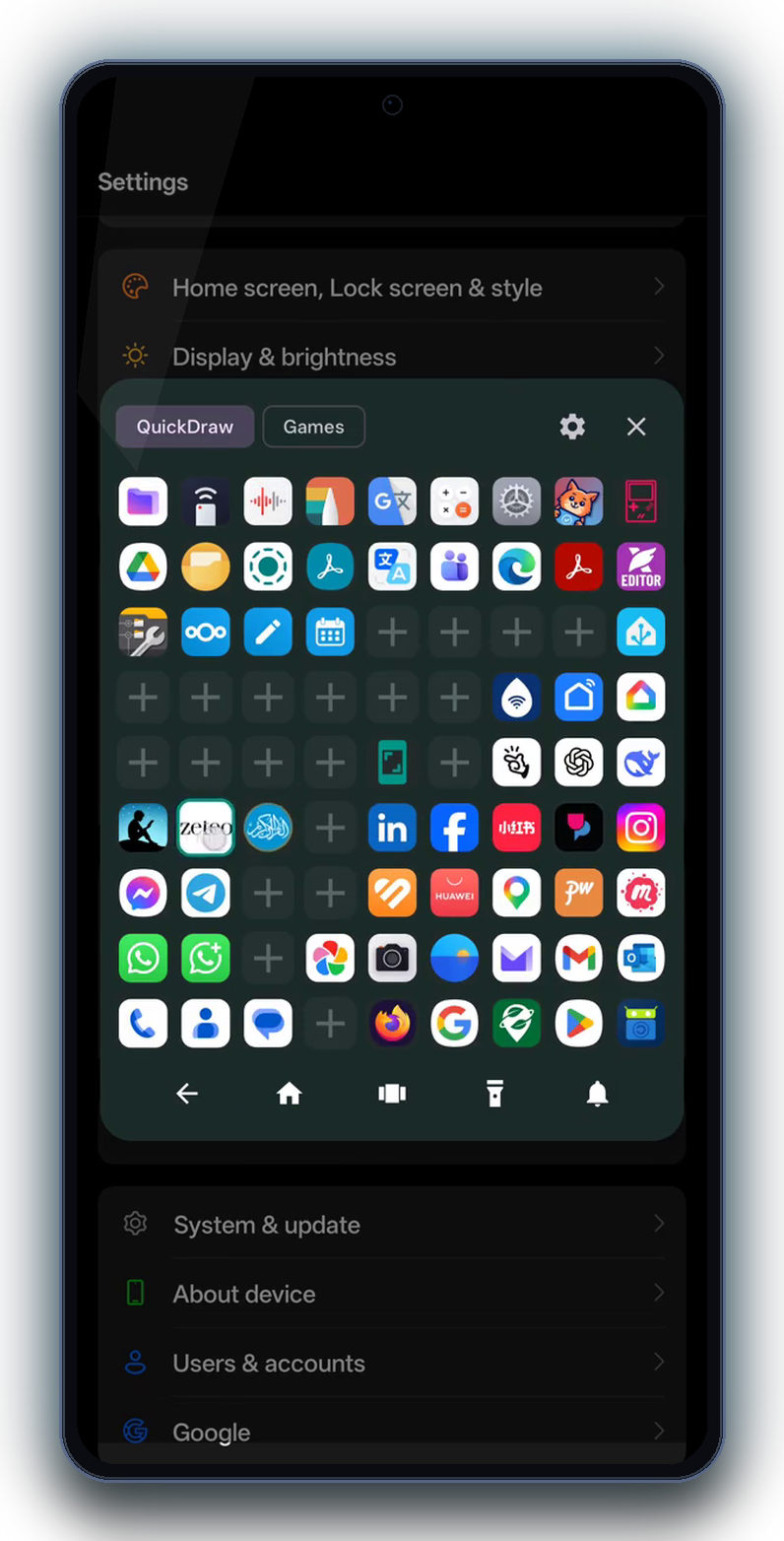
QuickDraw Launcher turns the edge of your phone screen into a lightning-fast application trigger. No need to exit to your home screen or swipe through app drawers—just glide your thumb inward from any border to summon a clean, floating rectangular grid of square app tiles, hover, and release.
Experience QuickDraw right in your browser. Glide inward from the glowing right edge or click the auto-demo trigger.
1. Mouse or Touch: Click & drag the glowing cyan strip on the right border inward towards the center.
2. Rectangular Grid Activation: As your thumb sweeps inward, the floating rectangular card of square app tiles slides into view.
3. Hover & Release: Glide over your target square tile and let go. The app launches instantly in sub-16ms.
Designed with muscle-memory ergonomics. Learn it in 30 seconds, use it effortlessly forever.
Enable the standard Android "Display over other apps" permission. QuickDraw operates purely as an on-demand screen overlay—no invasive Accessibility Services or background accessibility daemons required.
Position the edge trigger exactly where your thumb naturally rests. Choose the right edge, left edge, or bottom border. Fine-tune touch width, height, and vertical offset.
Choose your daily arsenal—WhatsApp, Camera, Calculator, Browser, or System Settings. Arrange them in customizable rows and columns for effortless muscle-memory access.
From inside ANY app, game, or video, swipe your thumb inward. The floating rectangular grid pops up in 60fps; hover over your target square app tile and release. Seamless context switching in sub-16 milliseconds.
Clean, minimalist design optimized for Android 15 edge-to-edge displays.
Built in Kotlin and Jetpack Compose with the open-source spirit of XDA and Linux EasyStroke.
Unlike background sync services, QuickDraw uses an event-driven overlay. When you are not touching the trigger area, the app consumes 0% CPU and zero wake locks.
We deliberately omitted the android.permission.INTERNET permission from the AndroidManifest. The app physically cannot send data to the cloud.
Inspired by the legendary EasyStroke gesture daemon on Kubuntu Linux and the de-bloated autonomy of XDA custom ROMs. Pure speed, zero ads, zero telemetry.
Fully compliant with the latest Google Play 2026 requirements, predictive back gestures, edge-to-edge system displays, and high-refresh-rate displays (90Hz / 120Hz).
Easily reposition or hide the trigger area so it never interferes with games, horizontal video playback, or keyboard typing.
Developed independently under IAMGREATER by Mr. Abdul Saboor. Backed by our public repository and plain-English privacy commitment.